
Apple Watch voice recorder: record on the watch, transcribe on iPhone
How to use the Apple Watch voice recorder in ThinkScribe: record from your wrist, transcribe on iPhone, and fix a recording that says Not sent.
Some of the most useful recordings happen when your phone is in a bag or on a desk across the room: a thought on a walk, a conversation at a site, the five minutes after a meeting when everyone summarizes what they agreed. The ThinkScribe watch app is a one-tap Apple Watch voice recorder for those moments. It records on the watch, sends the audio to your iPhone, and the iPhone does the transcription. This guide covers the setup and the loop.
Install the watch app
- Install ThinkScribe on your iPhone and open it once.
- Open the Watch app on the iPhone. Under Available Apps, install ThinkScribe, or turn on automatic app installation so it appears on its own.
- On the watch, open ThinkScribe. A short tour introduces Record Anywhere, Automatic transcripts and AI Summaries; tap Get Started.
The watch app is part of the same purchase. There is nothing separate to buy.
How to record a voice note on Apple Watch
- Open ThinkScribe on the watch, or add its complication to a watch face for a one-tap start.
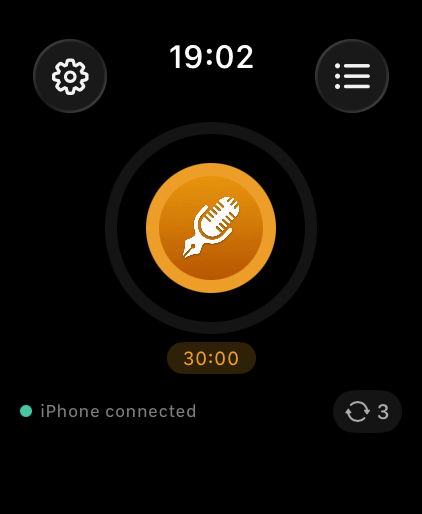
- Tap the record button. The screen shows the elapsed time and the time remaining, and the watch can buzz gently while recording so you know it is live. The line at the top reads iPhone connected when the phone is in range.
- Tap stop when you are done. The screen reads Saved on iPhone once the audio has been handed over, then Transcribing… and finally Recording saved.
You can also say Start a ThinkScribe recording to Siri on the watch, or use the Start Recording action in Shortcuts.
Choose how long a recording can be
Watch recordings have a maximum length so a forgotten recorder does not run for hours. In the watch app's Settings, under Recording Duration, pick 5, 10, 15, 30, 45 or 60 minutes. The countdown on the recording screen follows this choice, and a recording that reaches the limit is saved with the note Recording limit reached.
Where watch recordings go before they reach the iPhone
The watch does not transcribe. It records locally, then transfers the audio file to your iPhone over the normal watch connection. The transfer is checked end to end, and if it fails the watch keeps the recording and tries again. On the iPhone, ThinkScribe transcribes it in the background, identifies speakers it knows, and the transcript lands in the Library like any other recording. If Sync Across Devices is on, it is on your iPad and Mac shortly after. See sync transcripts between devices.
Nothing goes anywhere else. The audio goes watch to phone; transcription happens on the phone.
When the watch says Not sent
The Recordings screen on the watch lists every recording with its status: Not sent, Sending… or Saved.
- Not sent: the iPhone was out of range or ThinkScribe was not running on it. Bring the watch near the phone and open ThinkScribe on the iPhone; the transfer resumes. Tap the recording to try again by hand.
- Install ThinkScribe on iPhone: the phone does not have the app, or has not been opened since installing.
- Subscribe on iPhone to transcribe: the free uses on the iPhone have been used up. The recording is safe; it transcribes once the iPhone can.
- Low storage: recording saved: the watch is nearly full. The recording is kept; free some space before the next one.
Recordings stay on the watch until they are confirmed saved on the iPhone, so a missed transfer is never lost.
Read it on the iPhone
Open ThinkScribe on the iPhone. The recording appears at the top of the Library with the transcript. From there it is the normal workflow: tap a word to play the audio from that point, name speakers, and tap the AI button for a summary or action items. The Transcripts screen on the watch shows the same list with its status, so you can confirm from your wrist that a note has been transcribed. For daily entries the watch is often the whole of a private voice journal app, because the phone never has to come out of a pocket.
How a wrist microphone compares with a phone microphone
A microphone on your wrist and a microphone in a phone are built for the same job, but you hold them in very different places, and that is what shows up in the transcript.
Distance does most of the work. When you raise your wrist to speak, the microphone sits a hand's width from your mouth, closer than a phone on a table and far closer than a phone in a pocket. Sound level falls away quickly with distance, so the nearest voice dominates the recording. That is ideal for a spoken note, where the only voice that matters is your own, and it is why wrist recordings of your own speech usually come back clean even from a noisy street.
The same physics works against you in a group. A person two metres away arrives quiet and smeared with room reflections, and a speech recognizer given a faint, reverberant voice starts guessing. You see it as half-right sentences from the people across the table, and as speaker separation that cannot settle on how many people were in the room. For a meeting, a phone or a laptop in the middle of the table is the better recorder.
Two other differences are worth knowing. Wrist microphones are small and tuned for phone calls in the open air, so they favour close speech and hold down steady background noise. That helps outdoors, and it can also thin out a voice that was already faint. And a wrist is a moving object: wind across the microphone, a sleeve brushing over it, or an arm swinging as you walk all land as noise on top of the words. Turning slightly away from the wind and keeping your cuff clear of the microphone removes most of it.
Frequently asked questions
Can an Apple Watch record voice notes without the iPhone nearby?
Yes. The ThinkScribe watch app records to the watch itself and keeps the audio until the iPhone is back in range, then hands it over for transcription. Recordings stay on the watch until the transfer is confirmed, so a run or a walk without your phone is fine. The Recordings screen shows which entries are still waiting to be sent.
Can I transcribe on the watch itself?
No. The speech models run on the iPhone, where there is far more memory and battery. The watch records and displays the result.
How good is the watch microphone for a meeting?
Good enough for a conversation at a table, and excellent for your own voice. For a large room, put the iPhone on the table and record there instead; the two apps share the same library.
Does the recording use much battery?
Recording itself is light. Transferring a long recording to the phone is the larger cost, and it happens once. A 30-minute recording is routine.

