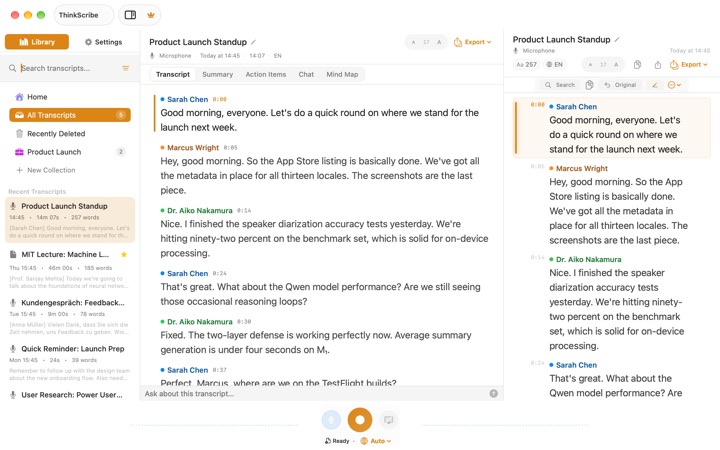
An offline transcription app runs the speech model on your own Mac, so your recordings are not uploaded to anyone to be turned into text. Apple silicon Macs are fast enough that this is now the better way to do it for most people: no per-minute bill, no waiting for an upload, and it works on a plane.
The apps differ a lot in what they do around the transcript. Some only transcribe files. Some label who spoke, fewer remember those people next time, and only a few record a Zoom or Teams call without sending a bot into it. We compared the apps people ask about most, plus Otter as the best-known cloud option, on the things that matter once you use one every day.
We make ThinkScribe, so it is in this list, and it is first. Every other app is described from its own website, help pages and App Store listing, checked on September 30, 2026. Prices and features change, so check their sites before you buy.
The short answer
- Best overall: ThinkScribe. Private by design, remembers speakers, records calls without a bot, AI notes and chat built in, one purchase for Mac, iPhone, iPad and Apple Watch.
- For power users who want to pick engines and bring their own AI keys: MacWhisper.
- If you mostly dictate rather than transcribe: Superwhisper.
- If you don't mind the cloud and want a web workspace: Otter.
- Free and open source: Buzz.
- Already on your Mac, for free: Voice Memos and Notes.
How we compared them
- Private and offline. Is the audio transcribed on the Mac, and does it work without a connection? Is there an account?
- Speaker labels. Does the transcript show who said what?
- Speakers remembered. Name someone once, and are they recognized in the next recording?
- Meetings without a bot. Can it record the other side of a Zoom, Teams or FaceTime call on the Mac itself, without a bot joining?
- Live transcript. Do the words appear while you record?
- AI with nothing to set up. Summaries, action items and questions about a recording, without API keys or a separate model runner.
- Your other devices and the price.
| App | Private and offline | Speakers | Calls without a bot | Live transcript | AI with no setup | Price |
|---|---|---|---|---|---|---|
| ThinkScribe | ✓ | ✓ named and remembered | ✓ | ✓ | ✓ | Free to try; $79.99/yr or $199.99 once |
| MacWhisper | ✓ | Pro | Pro | ✓ | ✕ own API key | Free; Pro about €64 once |
| Superwhisper | partly | Pro | Pro | Pro | cloud models | Free; $84.99/yr or $249.99 once |
| Otter | ✕ cloud, account | ✓ remembered, in the cloud | desktop app | ✓ | cloud | Free 300 min/mo; $99.99/yr |
| Buzz | ✓ | files only | ✕ extra driver | ✓ | ✕ plugins | Free |
| Voice Memos | ✓ | ✕ | ✕ | ✓ | summaries only | Free |
1. ThinkScribe: best overall
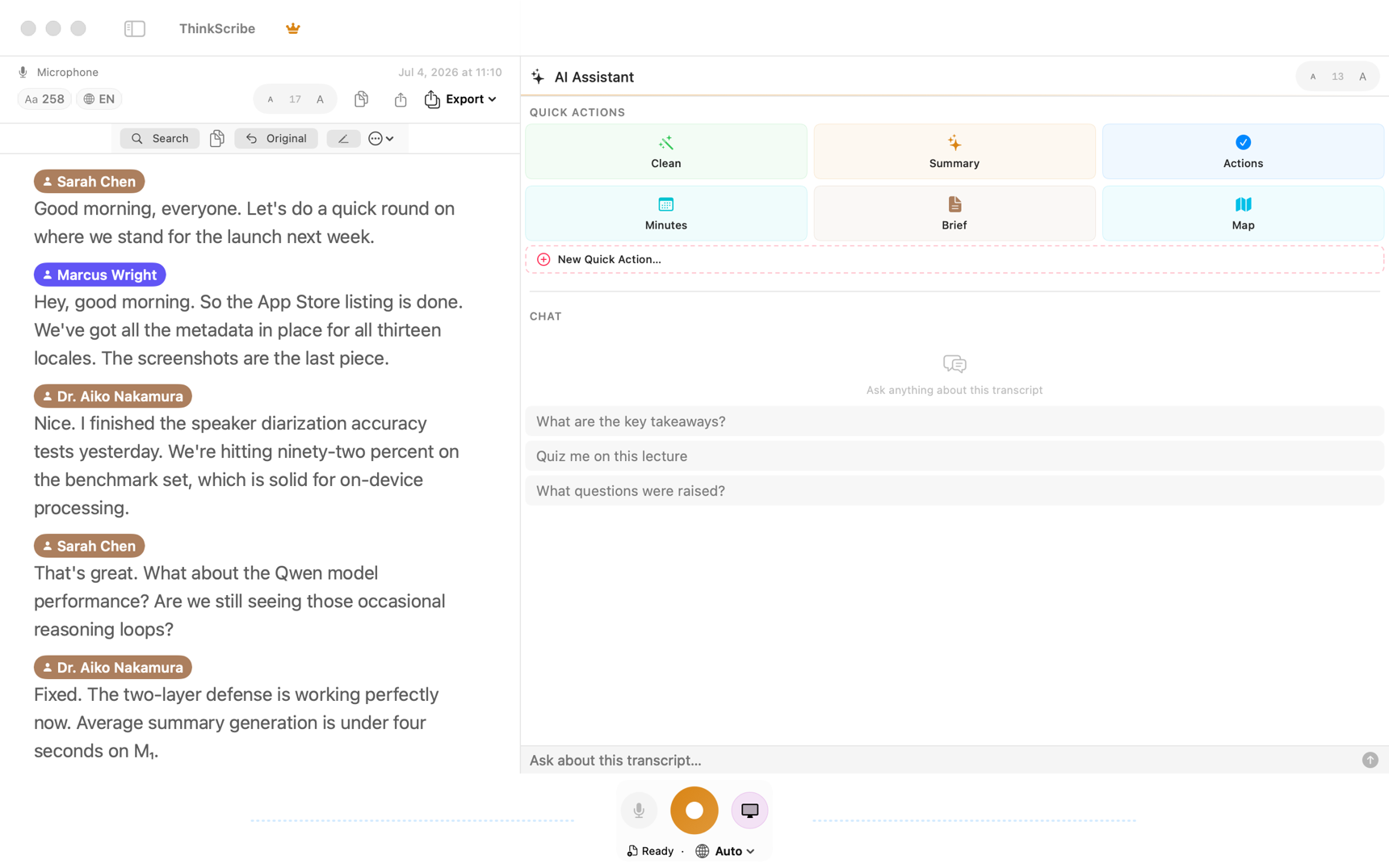
ThinkScribe is a recorder, transcriber, voice typing tool and AI notebook in one Mac app, and the same purchase covers iPhone, iPad and Apple Watch. Transcription and speaker labels run on your Mac with Parakeet, Whisper or Apple's speech engine. There is no ThinkScribe account, and your recordings and transcripts are never sent to us.
What sets it apart:
- Speakers are remembered, on your Mac. Rename "Speaker 2" to Sarah once, and Sarah is recognized in later recordings. No other app here documents doing that on the device.
- Meetings without a bot. Record your microphone and the call audio of Zoom, Teams, FaceTime or any app at the same time, with echo cancellation, and nobody sees a bot join.
- Live text. Words appear on screen while you record, and the finished transcript with speaker names is ready moments after you stop.
- AI with nothing to set up. Summaries, action items, meeting minutes, an executive brief and a mind map, plus a Chat tab that answers questions about the recording and cites the exact lines. It runs on ThinkScribe AI, a one-time download that works on your Mac, or on Apple Intelligence if you prefer. No API keys.
- A clean transcript and the original. The Transcript tab reads as clean text by default; switch to Original for every word with its timing, and click any word to play the audio from there.
- Voice typing in every app. Press Option-Space, speak, and the text goes where your cursor is.
- All your devices. Record on your Apple Watch or iPhone and read the transcript on your Mac. Sync is optional and runs through your own iCloud.
Exports: TXT, SRT, VTT, JSON, Markdown, PDF and Word, or straight into Apple Notes. It needs an Apple silicon Mac on macOS 26.
Price: free to download with free uses of every Pro feature, then $9.99 a month, $79.99 a year (half price the first year) or $199.99 once for life, on every Apple device.
Choose it if you want private transcription that also handles your meetings, your notes and your typing, on more than one Apple device.
2. MacWhisper: for power users
MacWhisper is the best-known Whisper app on the Mac and has a long feature list: several local engines (Whisper, Parakeet and Qwen3-ASR), optional cloud engines, batch and watched folders, subtitles and a command line. The free version transcribes files and exports TXT, SRT and VTT.
Speaker recognition, meeting recording and richer exports need Pro, a one-time license priced at about €64 on its site. Meeting recording and dictation into any app are only in the direct-download version; the App Store edition, sold as Whisper Transcription, has fewer Mac features, uses subscriptions, and is the one that runs on iPhone and iPad. AI summaries and chat need your own API key for a cloud provider, or a local model runner such as Ollama that you install separately. There is no Apple Watch app and no sync between devices.
Choose it if you like tuning engines, want to bring your own AI provider, and work on one Mac.
3. Superwhisper: if you mostly dictate
Superwhisper is first of all a dictation tool, with fast AI rewriting on Mac, Windows, iPhone and Android. Dictation with local Whisper models is free and unlimited.
Transcribing files, recording meetings, speaker separation and real-time transcription need Pro ($8.49 a month, $84.99 a year or $249.99 once). Most AI modes send your text to cloud language models, and its documentation says speaker separation works best with its cloud speech models. There is no iPad app and no sync between devices yet.
Choose it if you mainly want voice typing with AI rewriting and also use Windows or Android.
4. Otter: if the cloud is fine
Otter is the best-known AI meeting notetaker. It labels speakers, remembers people you have tagged, shows a live transcript and has a web workspace for teams. Its bot can join Zoom, Teams and Google Meet, and its Mac desktop app can record without one.
It is not an offline app: transcription and AI run on Otter's servers and you need an account. Otter's privacy policy says it trains its AI on de-identified recordings and transcripts. The free plan stops each conversation at 30 minutes and 300 minutes a month; Pro is $16.99 a month or $99.99 a year, with no one-time option.
Choose it if you want a shared web workspace for a team and uploading your meetings is acceptable.
5. Buzz: free and open source
Buzz is free and open source on Mac, Windows and Linux, built on Whisper with a wide choice of models, speaker identification for files and live transcription from the microphone.
It is a desktop tool for people comfortable with settings: recording a call's audio needs a separate virtual audio driver such as BlackHole, exports are TXT, SRT and VTT, AI features come from plugins you configure, and there is no iPhone app.
Choose it if you want free and open source and don't mind setting it up.
6. Voice Memos and Notes: the free baseline
Every Mac already has Voice Memos and Notes, and both now show a live transcript while you record, on the device, in 10 languages. On Macs with Apple Intelligence you can summarize a transcript.
They stop there for most work: Apple documents no speaker labels for ordinary recordings, Voice Memos lets you copy a transcript but not export it as a file, neither records the other side of a Zoom or Teams call, and there are no meeting minutes, action items or questions about the recording.
Choose them if you need a quick transcript of a voice note and nothing more.
Which one should you pick?
- You record meetings and want notes you can trust, with names on every line, without uploading anything: ThinkScribe.
- You want one app for recordings, notes and voice typing on Mac and iPhone: ThinkScribe.
- You want to choose engines and bring your own AI keys on one Mac: MacWhisper.
- You mostly dictate, including on Windows or Android: Superwhisper.
- Your team shares notes in a web workspace and the cloud is fine: Otter.
- You want free and open source: Buzz.
If your recordings are confidential, check that the app you pick transcribes on the device and has no account: on-device vs cloud transcription explains how to test that in two minutes.
More comparisons: the best dictation apps and voice keyboards for iPhone, the best AI meeting notes apps for Mac without a bot, the best voice recorder apps with transcription for iPhone and the best Otter.ai alternatives.
Frequently asked questions
What is the best offline transcription app for Mac?
For most people, ThinkScribe: it transcribes on your Mac with no account, labels and remembers speakers, records calls without a bot, and includes AI notes and chat with nothing to set up. MacWhisper is the pick for power users who want to choose engines and bring their own AI keys.
Is there a free offline transcription app for Mac?
Yes. Voice Memos and Notes transcribe on the Mac for free in 10 languages, without speaker labels. Buzz is free and open source. ThinkScribe is free to download with free uses of every Pro feature.
What is the best private alternative to Otter on Mac?
ThinkScribe does what people use Otter for (speaker labels that remember people, live transcript, summaries and questions about a meeting) but transcribes on your Mac, with no account and nothing uploaded to us.
Which Mac transcription app records Zoom and Teams without a bot?
ThinkScribe records your microphone and the call audio on the Mac itself, so no bot joins. MacWhisper Pro and Superwhisper Pro can also record a call on the Mac; Otter's desktop app records without a bot but transcribes in the cloud.
Does offline transcription work on an Intel Mac?
Most current apps need Apple silicon, including ThinkScribe and new versions of Buzz. Apple silicon is what makes local speech models fast enough for everyday use.
Sources
Checked on September 30, 2026.