A meeting bot is the extra participant called "Notetaker" that joins your Zoom, Teams or Google Meet call to record it. Clients notice it, some companies block it, and it means the recording lives on someone else's server. A bot-free app records the call on your own Mac instead: your microphone plus the sound of the call.
Bot-free is only half of privacy, though. Most bot-free apps still upload the audio to be transcribed. We compared the best-known bot-free meeting apps for Mac on where the transcript is made, whether you get real speaker names, and what the AI does with it.
We make ThinkScribe, so it is in this list, and it is first. The other apps are described from their own websites, help pages and App Store listings, checked on September 30, 2026.
The short answer
- Best overall: ThinkScribe. No bot, transcribed on your Mac, no account, real speaker names remembered across meetings.
- The popular cloud notepad: Granola.
- Cloud notetakers with an optional bot: Otter and Fireflies.
- Cloud with EU hosting: Jamie.
- For tinkerers who bring their own AI keys: MacWhisper.
How we compared them
| App | No bot | Transcribed on your Mac | No account | Speaker names | Remembers speakers | AI notes and chat |
|---|---|---|---|---|---|---|
| ThinkScribe | ✓ | ✓ | ✓ | ✓ | ✓ | ✓ built in |
| Granola | ✓ | ✕ cloud | ✕ | "Me" and "Them" on the desktop | not documented | ✓ cloud |
| Otter | desktop app, or bot | ✕ cloud | ✕ | ✓ | ✓ | ✓ cloud |
| Fireflies | desktop app, or bot | ✕ cloud | ✕ | bot mode only | not documented | ✓ cloud |
| Jamie | ✓ | ✕ cloud (EU) | ✕ | ✓ | ✓ | ✓ cloud (EU) |
| MacWhisper | ✓ with Pro | ✓ | ✓ | with Pro | not documented | your own API key |
1. ThinkScribe: best overall
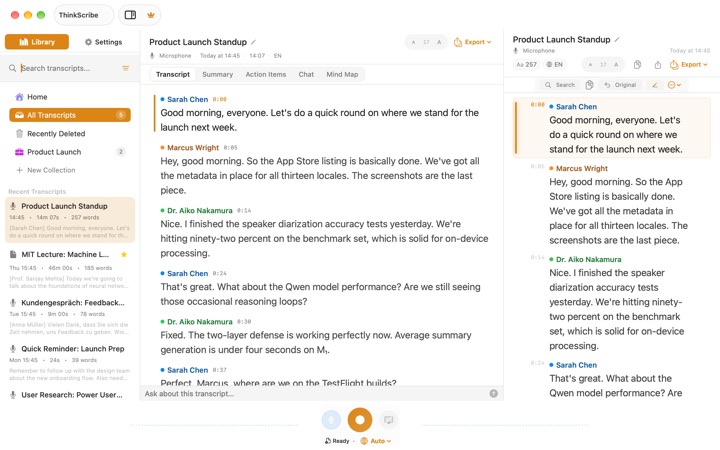
ThinkScribe records your microphone and the call audio of Zoom, Teams, Google Meet, FaceTime or any other app at the same time, with echo cancellation so your voice is not doubled. Nobody sees a bot. Transcription and speaker labels run on your Mac, there is no ThinkScribe account, and your recordings and transcripts are never sent to us.
- Real names on every line, next time too. Rename "Speaker 2" to Sarah once and Sarah is recognized in later meetings.
- Live text. The words appear while the meeting runs; the finished transcript is ready moments after you stop.
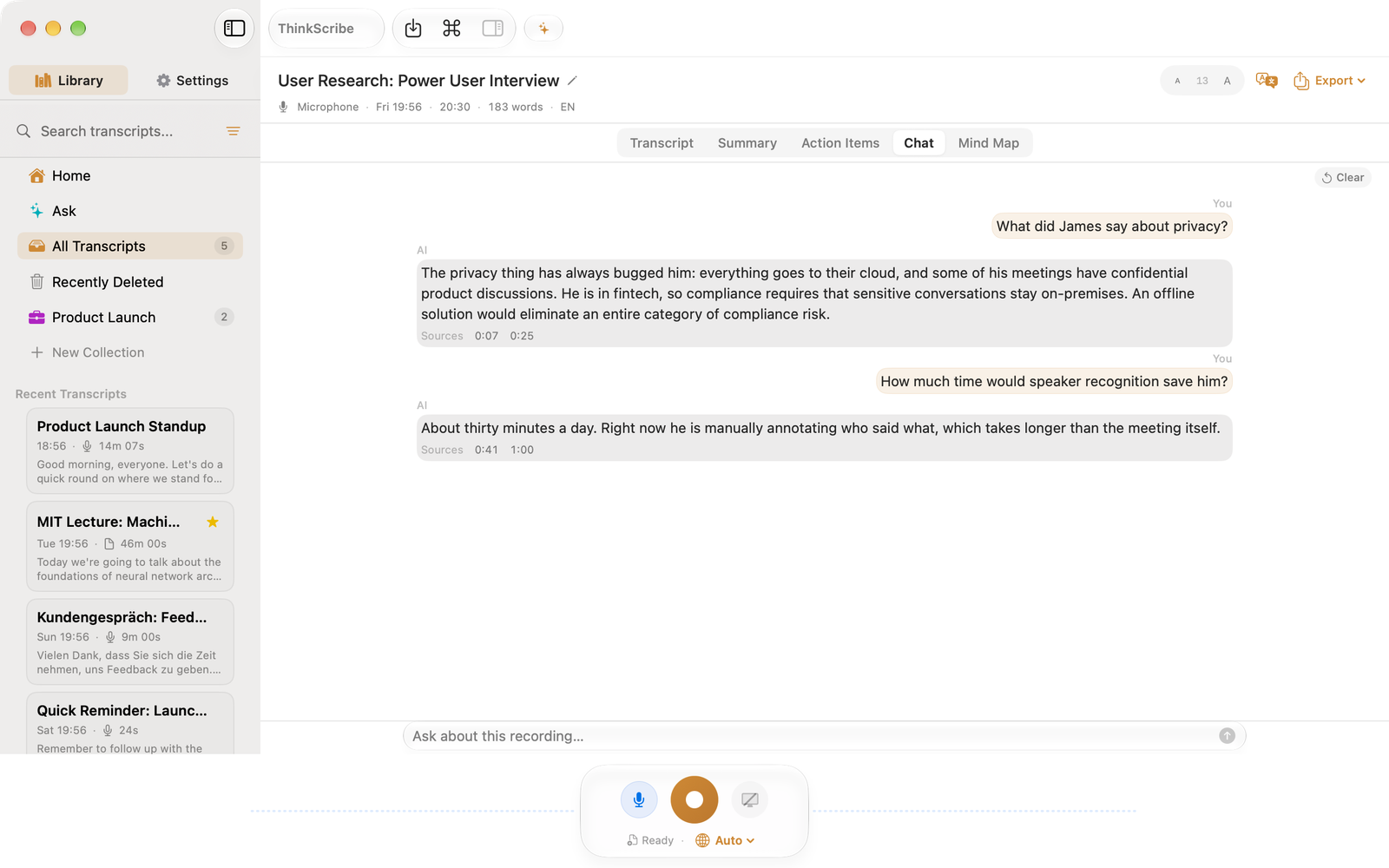
- Notes you can question. Summary, action items, meeting minutes and an executive brief, plus a Chat tab that answers "what did we decide about the launch?" and cites the exact lines. Click a citation and the audio plays from there. It runs on ThinkScribe AI on your Mac, or Apple Intelligence if you prefer.
- Works where you are. The same purchase covers iPhone, iPad and Apple Watch, so in-person meetings get the same treatment, and sync runs through your own iCloud if you turn it on.
- Export anywhere. Word, PDF, Markdown, subtitles, or straight into Apple Notes.
Choose it if your meetings are confidential, or you simply want names you can trust and notes that stay on your Mac.
2. Granola: the popular cloud notepad
Granola is a notepad for meetings: you type rough notes during the call and its AI turns them into full notes using the transcript. It captures the computer's audio without a bot, runs on Mac, Windows, iPhone, Android and Apple Watch, and does not store the audio.
Transcription and AI run in the cloud (its security page names Deepgram, AssemblyAI, OpenAI and Anthropic), it needs an account, and it trains on anonymized data unless you opt out. On the desktop the transcript shows "Me" and "Them" rather than each person's name, and the free plan keeps 30 days of history.
Choose it if you like writing your own notes and want AI to fill them in, and the cloud is fine.
3. Otter: the best-known notetaker
Otter labels speakers, remembers people you have tagged, shows a live transcript and has a shared web workspace. Its Notetaker bot joins Zoom, Teams and Google Meet, and its Mac desktop app can record without the bot.
Everything is processed on Otter's servers with an account, and its privacy policy says it trains its AI on de-identified recordings and transcripts. The free plan caps each conversation at 30 minutes.
Choose it if your team wants a shared cloud workspace and uploading meetings is acceptable. There is more in ThinkScribe vs Otter.
4. Fireflies: for sales teams in the cloud
Fireflies is built for business teams, with a large catalog of integrations and CRM sync. It can send a bot, or record without one through its desktop app or Chrome extension, and it says it does not train on your data by default.
It is cloud-only with an account, and in its bot-free mode the transcript shows "Speaker 1" and "Speaker 2" instead of names.
Choose it if you want meeting notes pushed into your CRM and your team's tools.
5. Jamie: cloud, but in the EU
Jamie records without a bot on Mac, Windows and iPhone, remembers labeled voices across meetings, and hosts everything in Germany. It deletes the audio once it is transcribed and says it does not train on meeting content.
It is still a cloud service with an account, it has no iPad app, and the free plan is limited to 10 notes a month and 30-minute meetings.
Choose it if you need a cloud service and EU hosting is your requirement.
6. MacWhisper: for tinkerers
MacWhisper's Pro version can record meetings from Zoom, Teams and other apps and transcribe them on the Mac, with speaker recognition and, in its newest version, a live meeting view.
Meeting recording is only in the direct-download version, speaker recognition is a Pro feature, and summaries or questions need your own API key for a cloud AI provider or a local model runner you install yourself. It has no sync between devices and no Apple Watch app.
Choose it if you want to assemble your own setup on one Mac.
Which one should you pick?
- Confidential meetings, or clients who dislike bots: ThinkScribe.
- You want names you can trust across every meeting, on your Mac and iPhone: ThinkScribe.
- You like to type your own notes and the cloud is fine: Granola.
- A shared web workspace for the team: Otter.
- Notes into your CRM: Fireflies.
- A cloud service hosted in the EU: Jamie.
How to record a meeting on a Mac covers the setup step by step.
More comparisons: the best offline transcription apps for Mac, the best dictation apps and voice keyboards for iPhone, the best voice recorder apps with transcription for iPhone and the best Otter.ai alternatives.
Frequently asked questions
Which meeting notes app for Mac doesn't use a bot?
ThinkScribe, Granola and Jamie never send a bot; Otter and Fireflies can record without one through their desktop apps. Of these, ThinkScribe is the one that also transcribes on your Mac instead of uploading the audio.
Can I record a Zoom or Teams meeting on a Mac without the other people seeing a bot?
Yes. ThinkScribe records your microphone and the call audio on the Mac itself, so no participant joins the call. Let people know you are recording, as the law and good manners require.
What is a private alternative to Granola?
ThinkScribe is bot-free like Granola, but it transcribes on your Mac with no account, names each speaker and remembers them, and keeps the recording so you can play back any line.
Do bot-free meeting apps still upload my audio?
Most do. Granola, Otter, Fireflies and Jamie send the audio to cloud transcription services. ThinkScribe and MacWhisper transcribe on the Mac. On-device vs cloud transcription explains how to check.
Sources
Checked on September 30, 2026.